


Anthropic recently announced Skills for Claude.
This has gained a lot of attention on the internet, just like Anthropic’s last release of the Model Context Protocol in November 2024.
Simon Willison, the co-creator of the Django Web framework, recently wrote that Claude Skills may be a bigger deal than MCP. However, when I first read about Skills, it appeared to me like a glorified prompting approach.
But is this true?
Let’s learn everything that you need to know to get started with Skills in this lesson, and answer this question.
Before we start, I want to introduce you to my new book called ‘LLMs In 100 Images’.
It is a collection of 100 easy-to-follow visuals that describe the most important concepts you need to master LLMs today.
Grab your copy today at a special early bird discount using this link.
What Is ‘Skills’?
Skills are simply folders/ directories that include instructions, scripts, and resources that Claude can discover and load on a task-specific basis.
Each Skill teaches Claude instructions to achieve a task better.
This could range from guidance on working with various file types (such as PDFs, CSV files, and others) to adhering to an organization’s brand guidelines. The possibilities are endless.
Skills transform general-purpose agents into specialized agents that fit one’s needs. — Anthropic
Anthropic previously used Skills to implement Claude’s document creation and editing functionality internally. However, they are now available for everyone to use and customize.
A High-Level Overview Of How ‘Skills’ Work
Let’s say that we give Claude a task to work on. Say it involves creating a PowerPoint presentation that highlights the trends in the use of AI across various industries.
What Claude does is automatically scan all available Skills to find the best suited for this task.
When it identifies the relevant Skills, it loads the instructions required to learn how to become an expert at solving this task. This is done in a token-efficient manner, the hows of which we will discuss soon.
Some qualities that make Skills amazing are:
They are like dynamic prompts that can be reused according to a task’s requirements. For example, if you prefer a specific format or reporting style, a Skill will help you achieve that each time without lengthy manual prompting.
They can be stacked together, and Claude can automatically coordinate their use.
They have the same format everywhere. Once built, a Skill can be used across Claude apps, Claude Code, and the API.
Skills can also have pre-written code (instead of just text instructions) that runs directly when Claude needs it to complete a task. This works best for math calculations, data processing tasks, API calls, and file operations.
A Peek Into The Internals Of A ‘Skill’
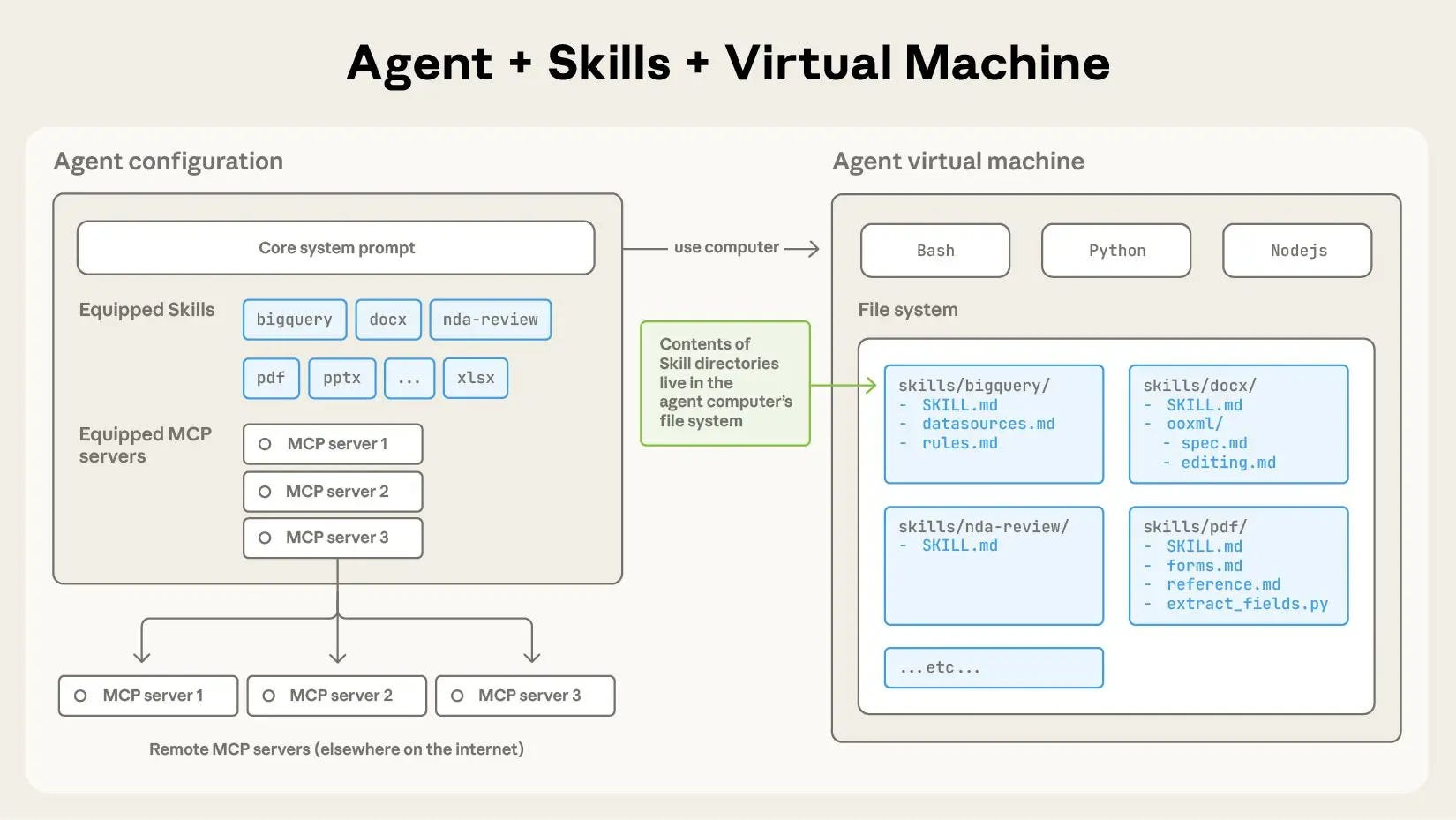
A Skill is a directory that contains a SKILL.md file. This directory is initialized in the LLM agent’s (Claude) virtual machine’s file system.
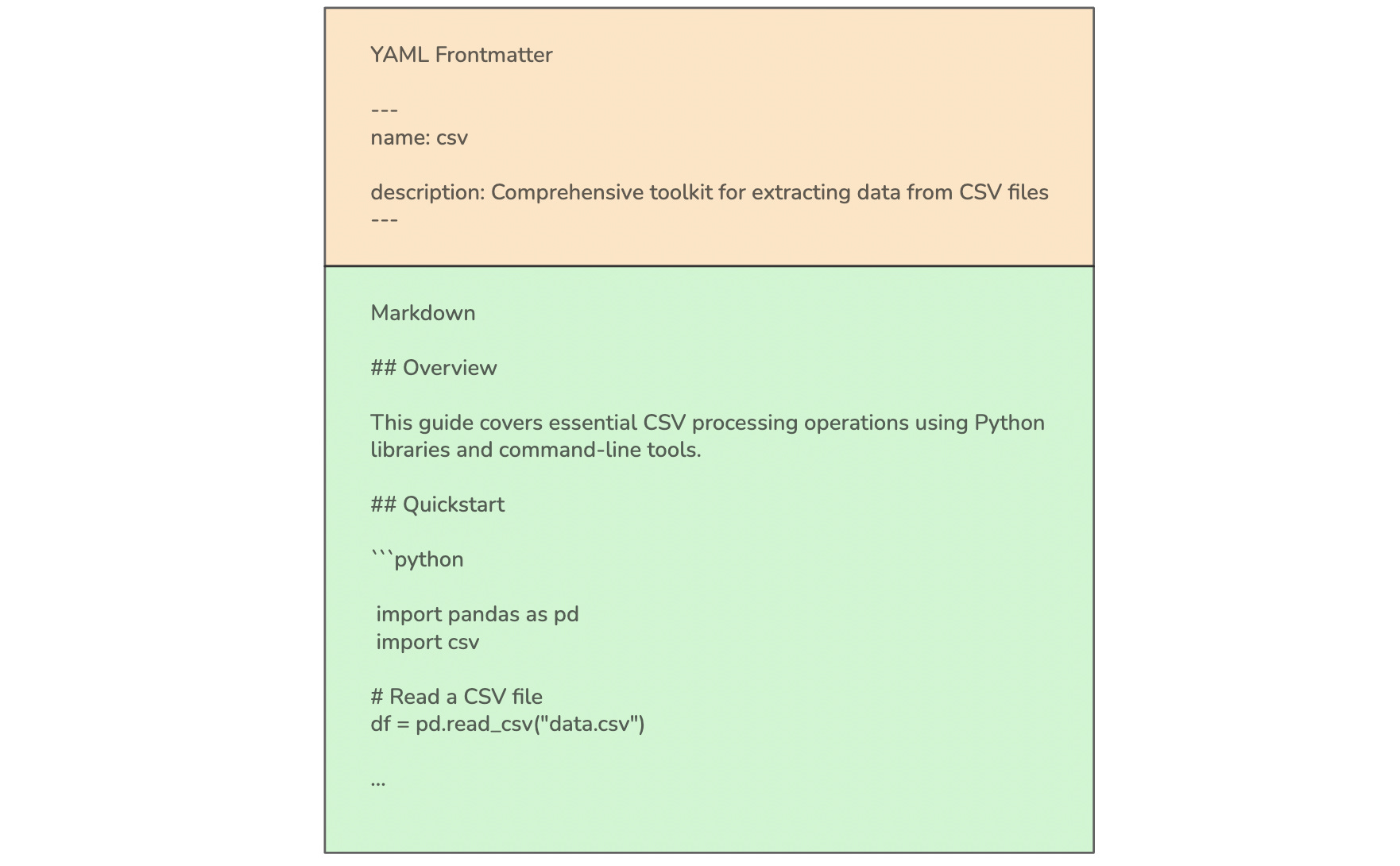
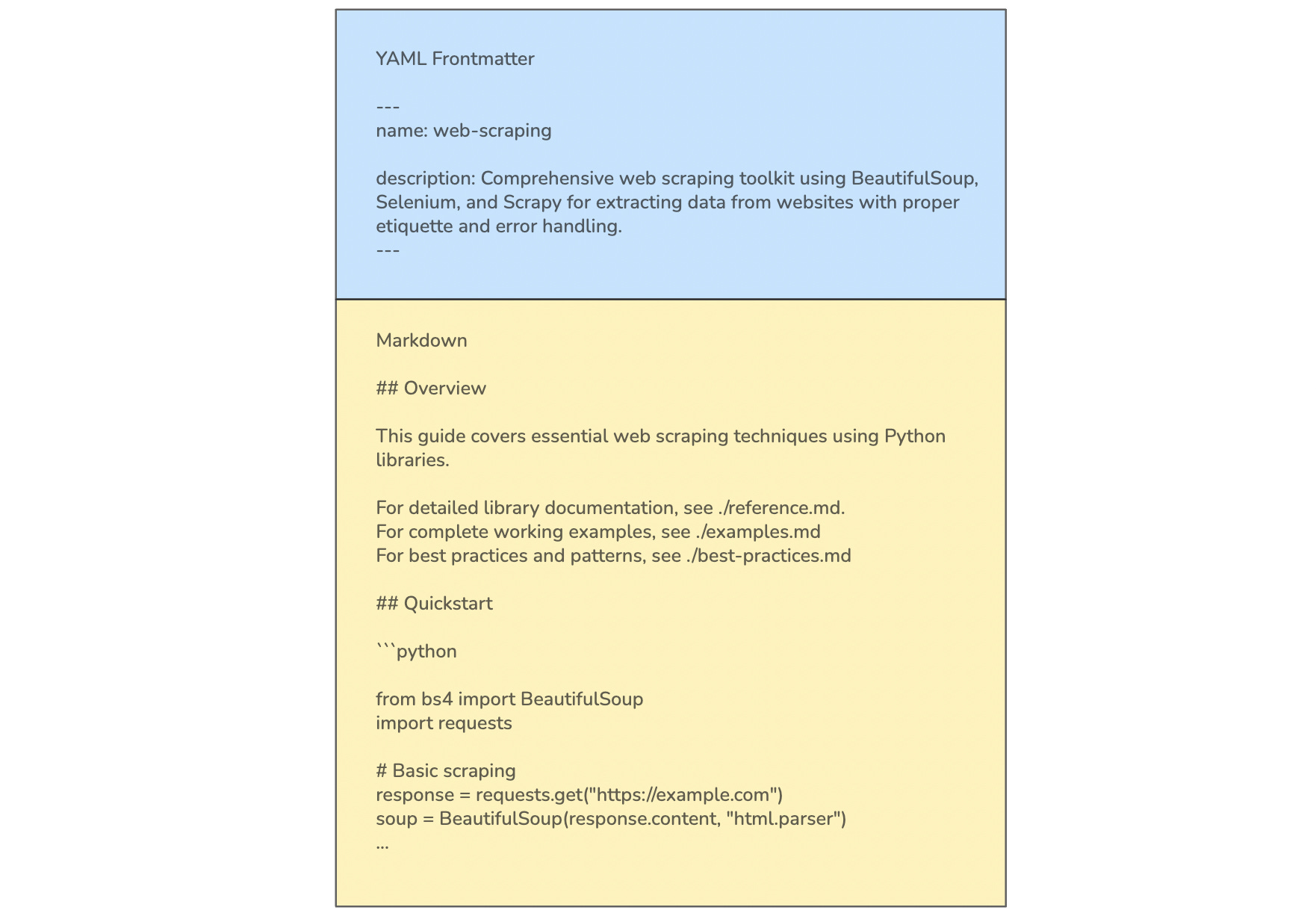
Each SKILL.md file has a YAML frontmatter with two fields:
name: The name of the Skilldescription: A short description of the Skill
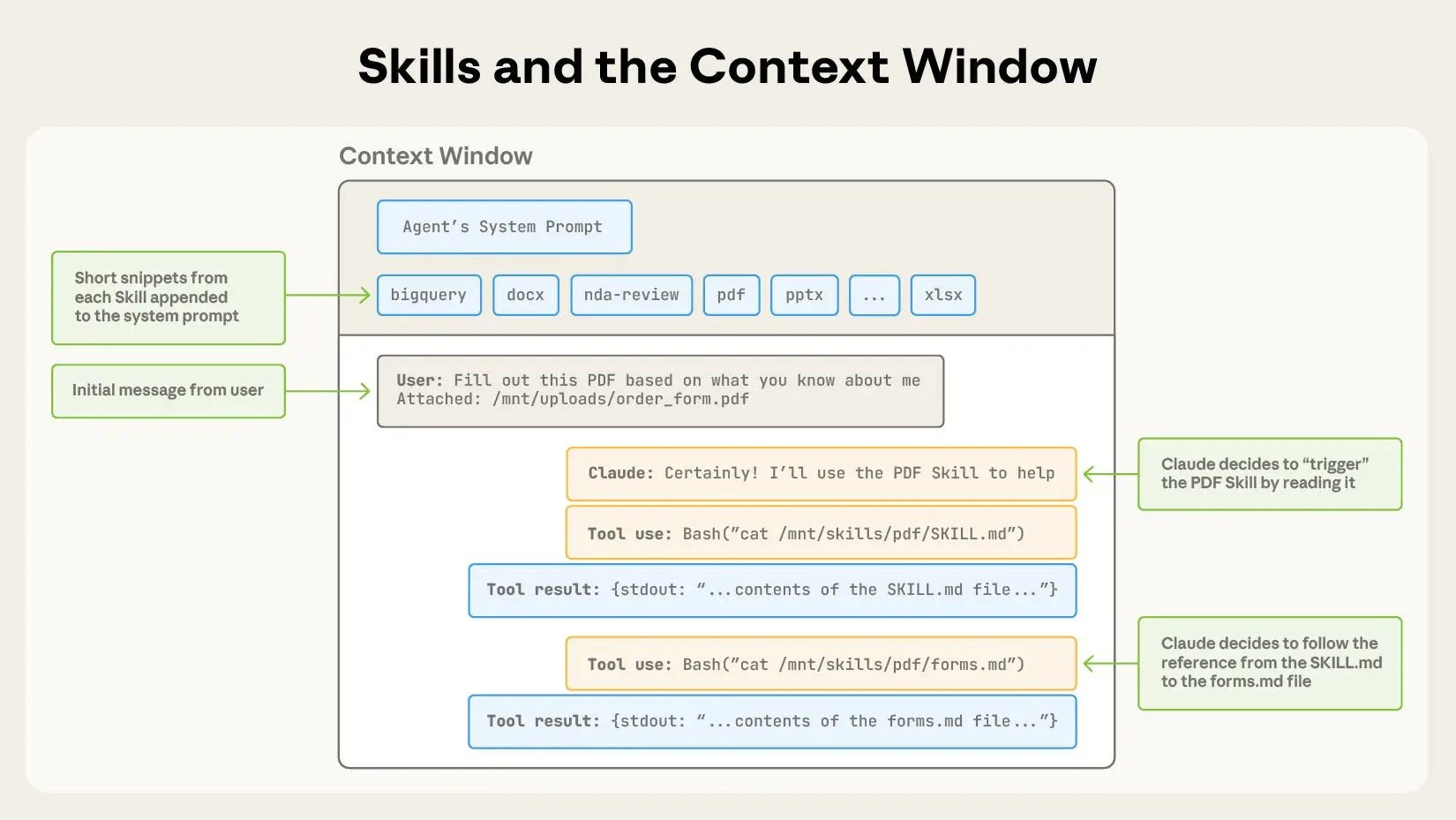
This is the metadata that Claude preloads into its system prompt, so it knows all the Skills available for use. This provides Claude with enough information on each Skill to determine whether it should be used for a task without loading all the content into its context.
What follows in the SKILL.md file is the main body that contains information on how to use a particular Skill in Markdown format.
If Claude figures out that it requires a specific Skill for a task based on the metadata that it had pre-loaded, it will load the complete SKILL.md file into its context.
This design principle is called Progressive disclosure, which means revealing information only on what’s needed at each step, rather than everything at once from the beginning.
If one wants to package a complex Skill that may contain quite a lot of context to fit into a single SKILL.md file, one can create additional files within the same Skill directory and reference them by name from the SKILL.md file.
An example is shown below for a Skill for web scraping. The main SKILL.md file references to three additional files (reference.md, examples.md, and best-practices.md) in the same directory for additional functionality that Claude can refer to if needed.
How To Create A Custom ‘Skill’
Now that we understand what a Skill is internally, creating a custom Skill is straightforward.
Simply create a folder, giving it the Skill’s name, with a SKILL.md file inside that contains YAML frontmatter followed by detailed markdown instructions.
The frontmatter must contain:
name: A unique identifier for the Skill written in lowercase with hyphens for spaces.description: A description of what the Skill does and when it should be used.
A template for creating a Skill is given below.
name: skill-name
description: A description of what this skill does and when it should be used

### Overview
A detailed description of the Skill along with references to other files
if additional functionality is required.

## Guidelines
- Guideline 1
- Guideline 2

## Examples
- Example 1
- Example 2
Here is an example of a Skill that can be used for email formatting based on the above template.
name: email-formatting
description: Format professional emails with proper structure and tone

## Overview
This Skill provides templates for writing professional emails.
Apply these patterns when drafting business correspondence,
client communications, or formal requests.

## Structure
Subject Line: Clear, specific, under 50 characters

Opening:
Formal: “Dear [Name],”
Professional: “Hi [Name],”

Body:
State purpose in first sentence
Keep paragraphs short (2-3 sentences)
Use bullet points for lists

Closing:
“Best regards,” (standard)
“Thank you,” (when requesting)
“Sincerely,” (formal)

## Example
Subject: Q3 Report Review Request

Hi Sarah,
I’ve completed the Q3 financial report and would appreciate your review
by Friday.

Key highlights:
- Revenue up 15%
- Expenses reduced by 8%
- New client acquisition on target

Please let me know if you have any questions.

Best regards,
Alex

## When to Apply
Use when creating:
1. Business emails
2. Client correspondence
3. Meeting requests
4. Follow-up messages
A public repository that contains various Skills by Anthropic can be accessed using this link.
How To Use A ‘Skill’ In Claude Chat
Once we’ve created our custom Skill folder, we need to create its ZIP file. This ZIP file should contain the Skill folder as its root and not a subfolder.
An example of the correct folder structure is:
my-Skill.zip
└── my-Skill/
    ├── SKILL.md
    └── extra-functionality.md
This ZIP file can then be uploaded to Claude chat after navigating to Settings/ Capabilities and enabled for Claude to start using the Skill.
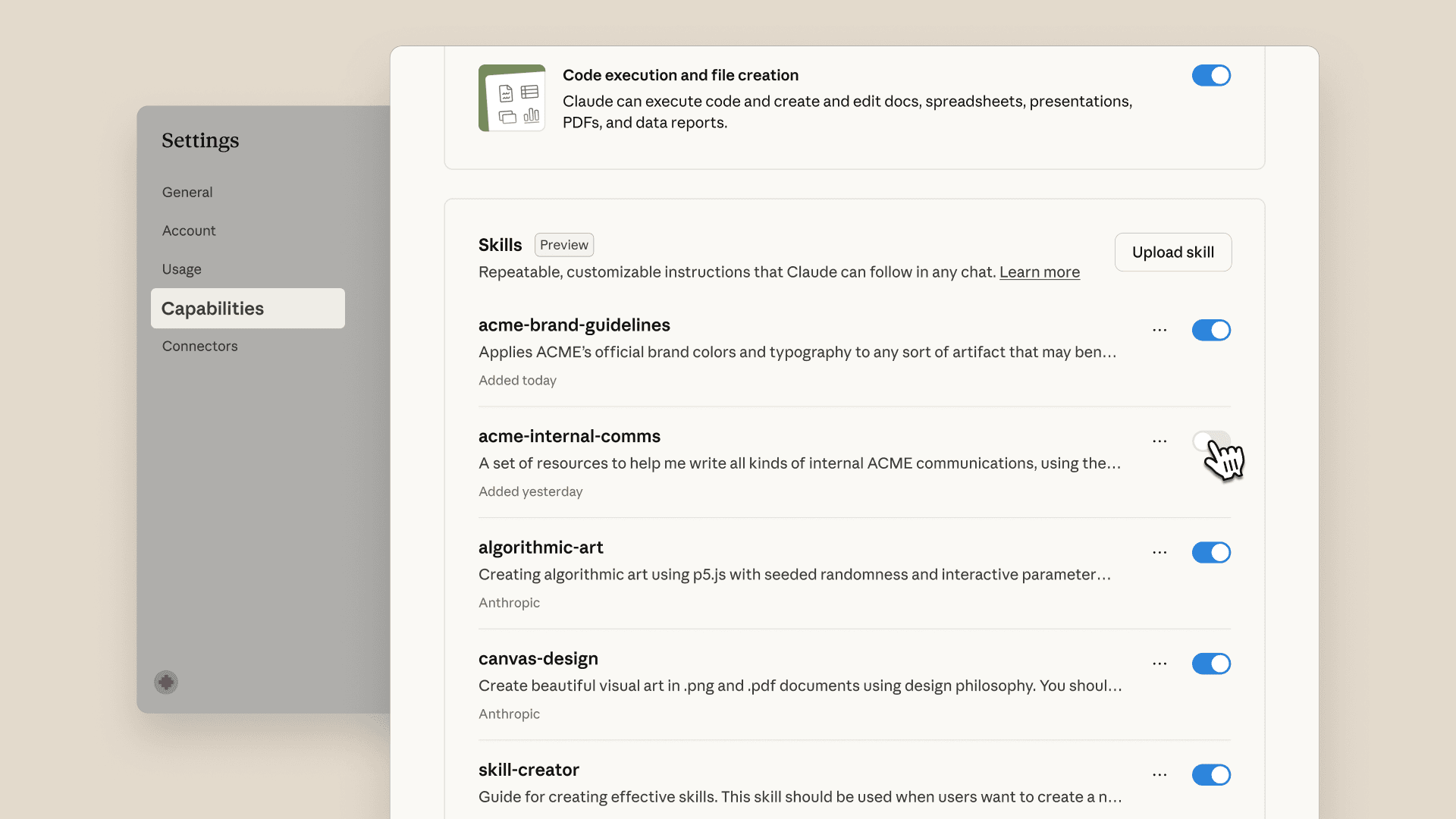
Claude can determine which Skills to use to complete a task based on the metadata for each enabled Skill. Once found, it will invoke a Bash tool to read the content of the required Skill folder.
To use Skills elsewhere, follow the detailed documentation using the following links:
Note that Skills are currently only available to Anthropic’s Pro, Max, Team, and Enterprise users.
Are ‘Skills’ Safe To Use In Your Projects?
In general, yes.
However, you must thoroughly test a Skill before using it. This is especially true for Skills created by third parties.
You should be well familiar with the instructions, code dependencies, and bundled resources, such as images or scripts, in a Skill that you are about to use.
Malicious actors might hide instructions/ code within a Skill that could instruct Claude to:
connect to potentially untrusted external network sources
fetch harmful data from external URLs
leak sensitive data to external systems
perform critical operations with unintended and malicious effects
It is recommended that you use Skills that are either created by you or by trusted sources, such as Anthropic.
Are ‘Skills’ Just Glorified Prompting?
Returning to this question that we started with, I can confidently say that Skills are not just a fancy prompting approach.
A Skill equips an LLM agent (Claude) with specific capabilities that it can progressively discover as needed. This approach is highly token efficient.
Alongside this, a Skill can be standardized and shared with a team or others to ensure that everyone uses the same approach for common tasks. This is expected to lead to consistent agentic behavior each time, whereas with manual prompting, the results may vary depending on how things are worded in each session.
That’s everything that you need to get started with using Skills in your own projects. See you soon in the next lesson!
Further Reading & References
Article titled ‘Equipping agents for the real world with Agent Skills’ on Anthropic Engineering blog
YouTube video from Anthropic on how to create custom Skills and use them with Claude

I've been using the same approach during my office times -
Context : I'm working on ~migration JDK8 -> JDK17~ our huge codebase -
.GitHub folder
|_agents folder
|_javax-namespace-jakarta.md
|_copilot-instructions.md
My managers who doesn't know how to get stuff done leveraging GEN AI - they were awestruck lol ! But lit of R & D goes on from my side before creating the agents and there workflows and coordination
They took 8 months for namespace migration
I've took 4 fking days lol 🪄.
I'm glad sharing this here 🫶