



GPU specification sheets are packed with jargon and confusing metrics. This guide simplifies them and helps you learn how to pick the best GPUs for your LLM workflows.
The NVIDIA H100 is one of the most popular GPUs for large-scale LLM training and inference. Here is what its GPU spec sheet looks like.
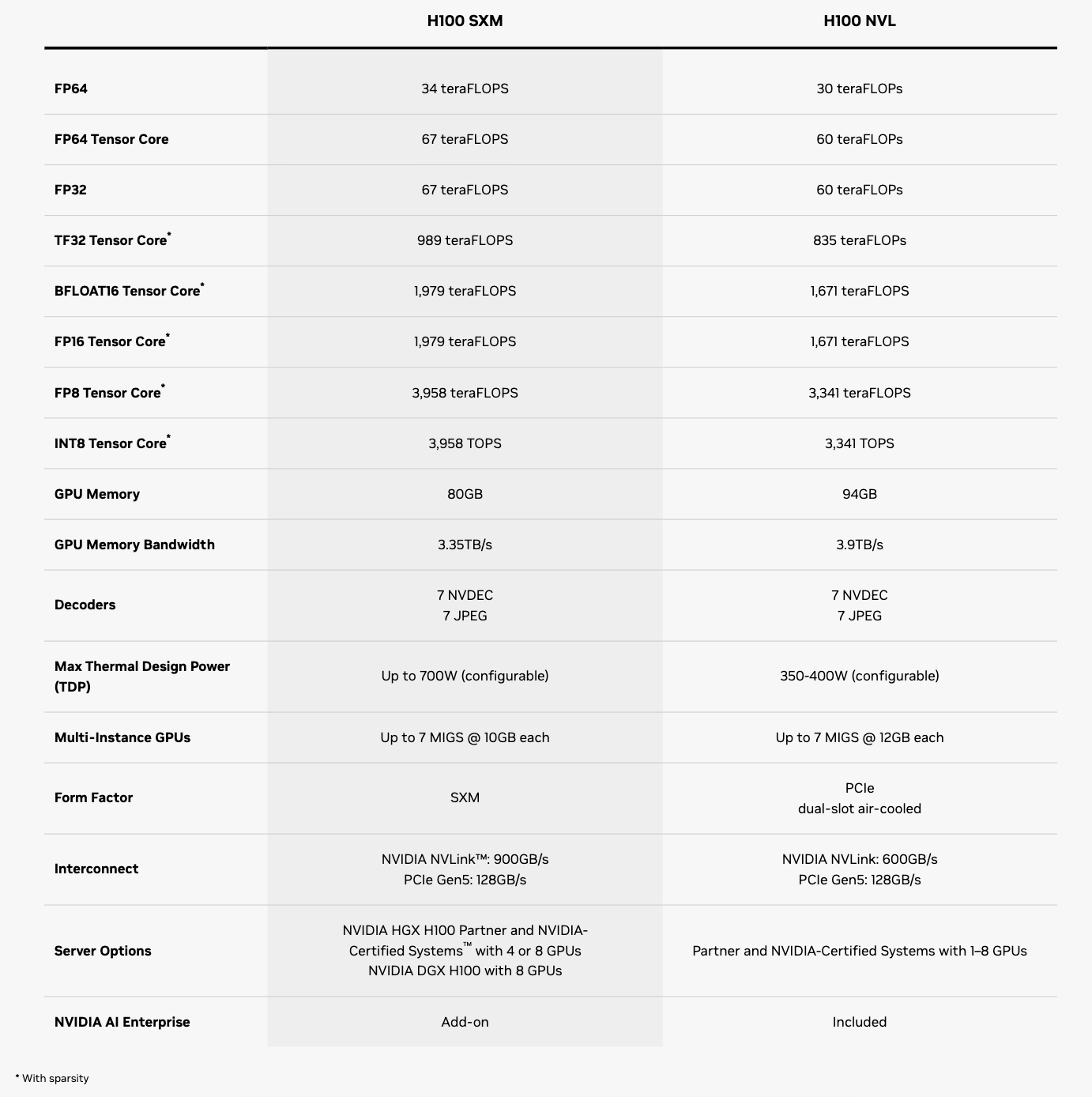
Let’s break down and learn what each of these rows means, one at a time.
1. Form factor
Two variants of the H100 GPU are compared in the spec sheet: H100 SXM and H100 NVL.
The main difference between them is the form factor, which refers to the GPU's size, shape, and mounting style. The form factor determines the power limit, cooling design, and the number of GPUs that can be connected together.

H100 SXM (Server PCI Express Module) follows the SXM form factor. This means that the GPU can be directly mounted on a specialized GPU baseboard with a custom SXM socket. This provides higher performance and power, better cooling, and the option to connect 4 or 8 GPUs together using NVLink/NVSwitch, NVIDIA’s proprietary high-bandwidth interconnect.
H100 NVL follows the PCIe form factor. This means the GPU must be connected to the motherboard using a PCIe slot, which offers greater compatibility and easier installation but provides a lower power limit and inter-GPU bandwidth.
H100 NVL is sold as a pair of GPUs connected via NVLink, and hence the name.
NVIDIA also produced the standard H100 PCIe version (not shown in the spec sheet above), which can also be connected to another H100 using NVLink. However, the H100 NVL has higher memory bandwidth than the PCIe version because it uses HBM3, whereas the PCIe version uses HBM2e, an earlier HBM standard.
2. GPU memory capacity
The GPU memory row (also generally called VRAM) refers to the capacity of the GPU’s High Bandwidth Memory (HBM).

When running an LLM, this is one of the first figures to consider.
A GPU’s HBM stores:
LLM weights and activations (during both training and inference)
KV cache (during inference)
Gradients and optimizer states (during training)
CUDA/runtime workspaces and temporary buffers/tensors (during both training and inference)
Let’s say that we are deploying the Qwen3-32B model in BF16 or FP16 precision. Since the model has 32.8B parameters and each parameter takes 2 bytes, the parameters alone require 61 GB (32.8B × 2 bytes ≈ 61 GB).
The H100 SXM has 80 GB of HBM, which is enough to hold this model’s parameters but can fill up quickly once you add the KV cache and runtime buffers, especially for longer context-length workloads.
The Qwen3-32B model has:
64 layers
8 KV heads
128 dimensions per head
At BF16, its KV cache is roughly:
KV cache size = 64 x 8 x 2 (one each for K & V) x 128 x 2 bytes = 262,144 bytes ≈ 0.25 MB per token
For a sequence of length 8000 tokens and a batch size of 1, this makes:
KV cache size = 8000 tokens x 0.25 MB ≈ 2 GB
These 61 GB of parameters, along with a 2 GB KV cache and additional overhead, might fit within the 80 GB of HBM. But if you require a larger batch size or have long-context requests, you’d need to either:
Reduce the precision of the model parameters
Use a GPU with more HBM (such as H100 NVL with 94 GB of HBM)
3. GPU memory bandwidth
Memory bandwidth refers to how quickly the GPU can move data between its HBM and its streaming multiprocessors (SMs).

H100 NVL has higher bandwidth than the SXM version. This means it can move LLM weights from HBM to the compute cores faster.
