


Before we begin, I want to introduce you to my book “LLMs In 100 Images”.
Are you struggling to keep up with LLMs and developments around them? I wrote this book to solve this for you!
“LLMs in 100 Images” turns the difficult parts of modern LLM systems (Attention variants, prompting techniques, sampling techniques, post-training algorithms, and more) into visuals, making them simple to understand.
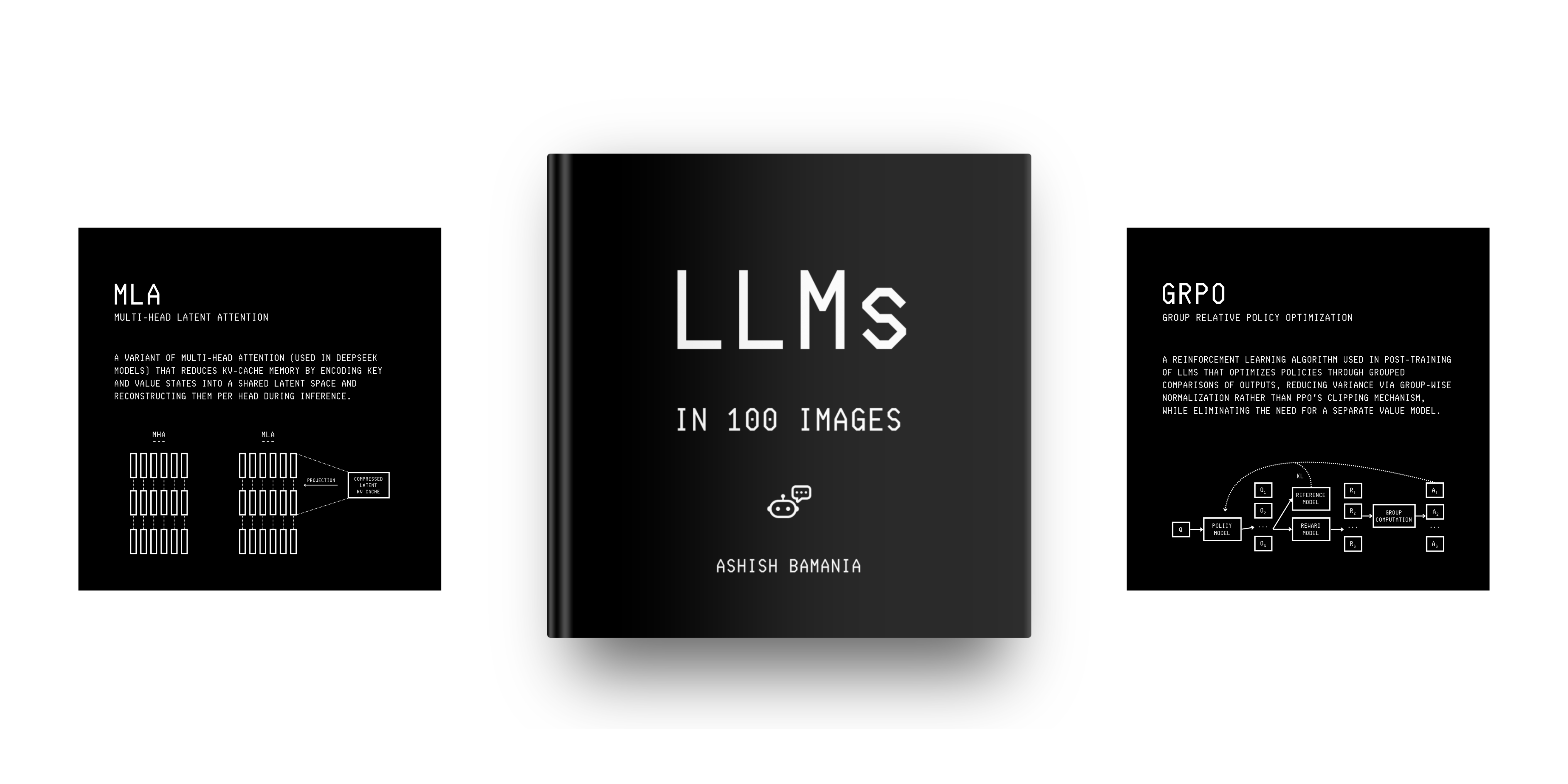
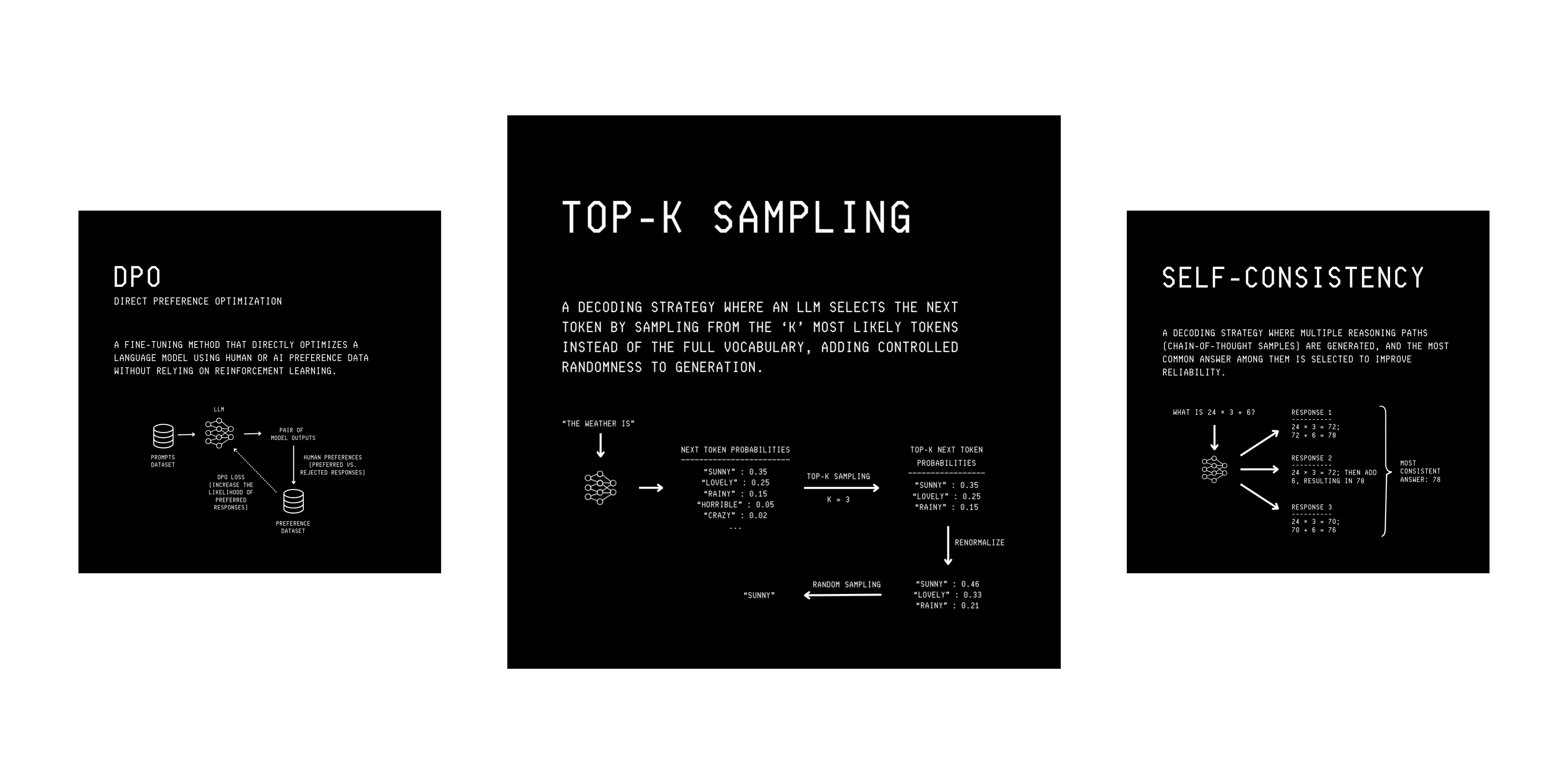
I’m running a flash sale on the book for a very limited time, and you can grab your copy today at a 30% discount!
GPUs are driving the current AI revolution, and understanding them well will make you invaluable in the AI ecosystem. In this lesson, we will learn about NVIDIA GPUs and the interconnects that scale them to massive data centers used for training and serving LLMs.
Let’s begin!
But first, what is a GPU and why is it needed?
A GPU, or Graphics Processing Unit, is a specialized chip originally designed to render 3D graphics rapidly and efficiently.
But it soon became clear that the same mathematical operations (matrix addition and multiplication) used in graphics could also be used to train and serve AI. This made NVIDIA, a company that started as a chipmaker for video games, the leading company building GPUs for AI today.
GPUs are quite different from CPUs, which are the chips used for general processing in the computer. While CPUs contain a few powerful cores that are perfect for executing tasks with sequential and branching logic at very low latency, GPUs are the masters of parallel computing.
They have thousands of cores, each slower than a CPU core, but together they produce massive throughput for parallel computations, especially matrix or tensor operations. (A matrix is a 2D tensor).
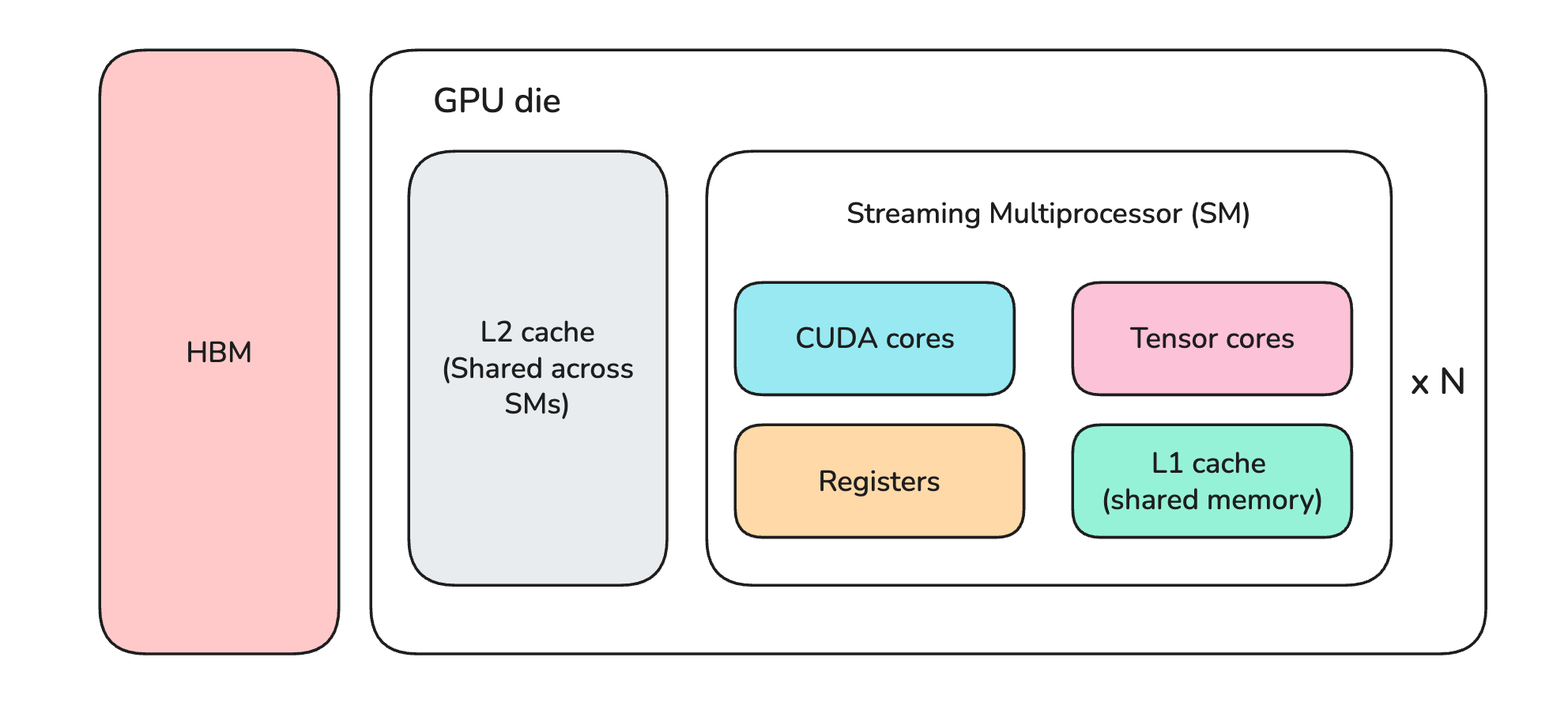
A GPU has units called Streaming Multiprocessors (SMs), where calculations actually take place. Each SM contains smaller specialized components called:
CUDA cores: that perform fast general mathematical operations
Tensor cores: that perform fast matrix operations
Alongside this, a GPU has two types of memory:
On-chip memory (L2 cache, L1 cache, and registers) that is physically etched on the GPU die
High Bandwidth Memory (HBM), generally called global memory or VRAM, that is mounted alongside the die
HBM is a specialized type of Dynamic random-access memory (DRAM) designed for massive parallel data throughput.
On-chip memory components are Static random-access memory (SRAM), which is extremely fast but much smaller and more expensive than the GPU HBM.
If you’re interested in reading about how data flows through CPU and GPU during LLM inference, here is a lesson that will help:

The NVIDIA ecosystem of GPUs
NVIDIA GPUs come in different architectures, each named after a famous scientist or mathematician.
The company produces consumer-grade GPUs for graphics and gaming in its GeForce GTX (older) and RTX series. It also produces the RTX PRO (previously known as Quadro) series for commercial/ scientific/ creative workloads on workstations.
We won’t be discussing these GPU architectures in this lesson, but we'll focus more on data center-grade GPUs designed for deep learning/AI.
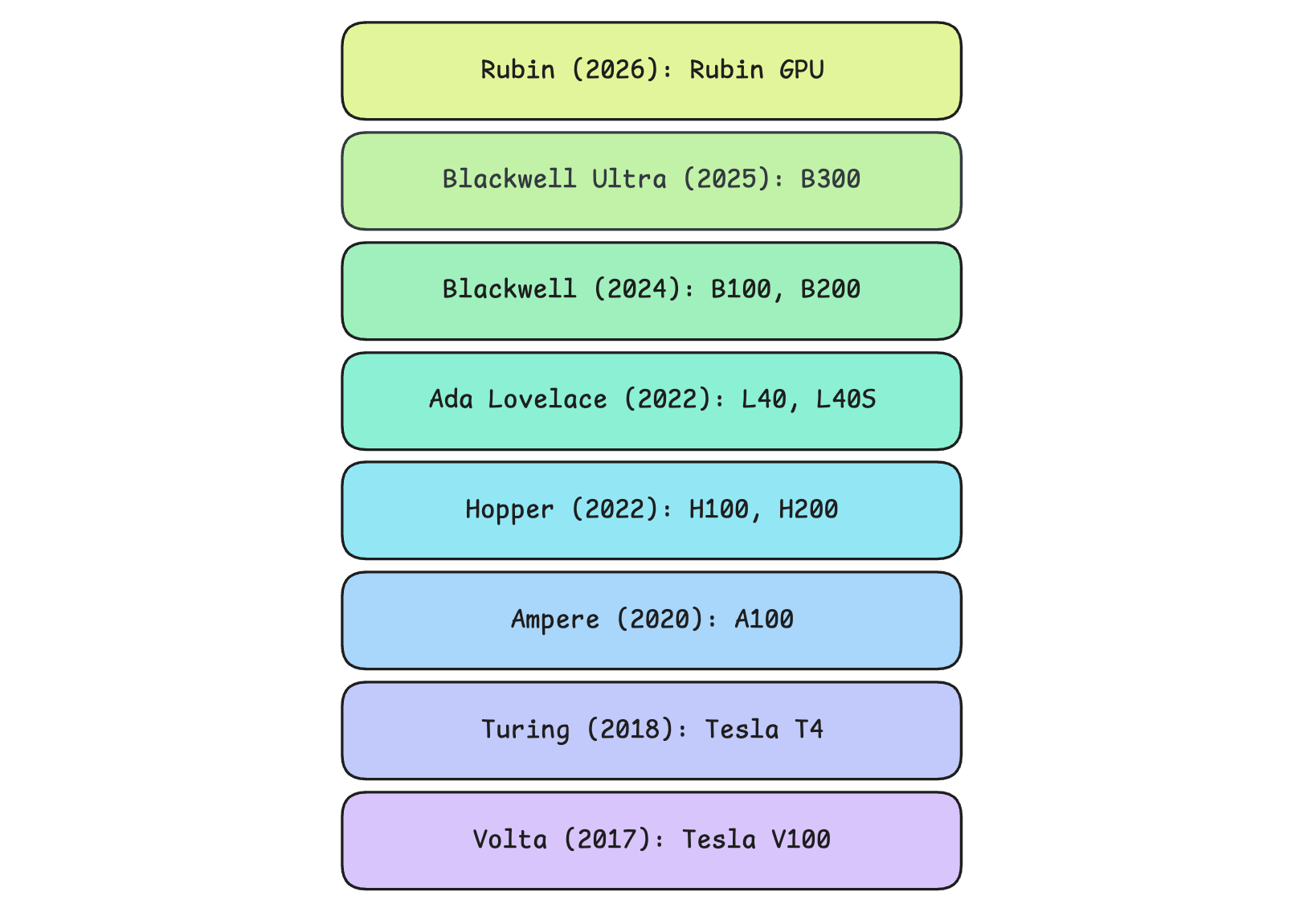
In 2017, NVIDIA introduced Tensor Cores and FP16 mixed-precision training for deep learning in its Volta series of GPUs (Tesla V100). OpenAI used a cluster of these GPUs to train GPT-3.
Since then, NVIDIA has made its GPUs more performant, and some popular architectures with their flagship GPU models released are:
Turing series in 2018 (Tesla T4): Optimized for lower-precision integer (INT8/INT4) inference pipelines
Ampere series in 2020 (A100): Used to train early LLMs and serve many GPT-3-scale models.
Hopper series in 2022 (H100, H200): Introduced the Transformer Engine and FP8 precision, which were used in the training of Llama 3 and similar models
Ada Lovelace series in 2022 (L40, L40S): Designed for high-performance AI inference and graphics rendering tasks
Blackwell series in 2024 (B100, B200): Built for training and serving trillion-parameter reasoning models with support for FP4 (4-bit floating-point) precision
Blackwell Ultra series in 2025 (B300): Improved Blackwell generation with more memory and higher performance (~50% higher FP4 compute)
Rubin series in 2026 (Rubin GPU): Designed to provide roughly double the FP4 compute (50 vs 20 PFLOPS) and GPU-to-GPU bandwidth (3.6 TB/s vs 1.8 TB/s) compared to the Blackwell series GPUs.
Rubin Ultra (announced to be released in 2027)
Feynman (announced to be released in 2028)
Understanding inter-GPU connections
A popular GPU like H100 from the Hopper series has 80GB of HBM. A single such GPU is too small to fit the weights of today's trillion-parameter large reasoning models, which have hundreds of GBs of parameters. This is why multiple GPUs are connected to form a large server (also called a Node). This approach is called Vertical scaling or the “scaling-up” approach.
There are different ways GPUs can be connected in a server:
PCIe (Peripheral Component Interconnect Express): This is the general-purpose connection used inside servers to connect GPUs, network cards, SSDs, and other devices to the CPU. The 6th generation PCIe offers 256 GB/s of GPU-to-GPU bandwidth. PCIe makes GPU-to-GPU data take a slower path through the CPU's root complex, which increases latency and reduces bandwidth.
NVLink: This is NVIDIA’s proprietary communication channel that gives a dedicated high-speed data path between GPUs. The bidirectional bandwidth between two GPUs provided by different generations of NVLinks is as follows:
900 GB/s on H100 (NVLink 4)
1.8 TB/s on B200 (NVLink 5)
3.6 TB/s on Rubin (NVLink 6)
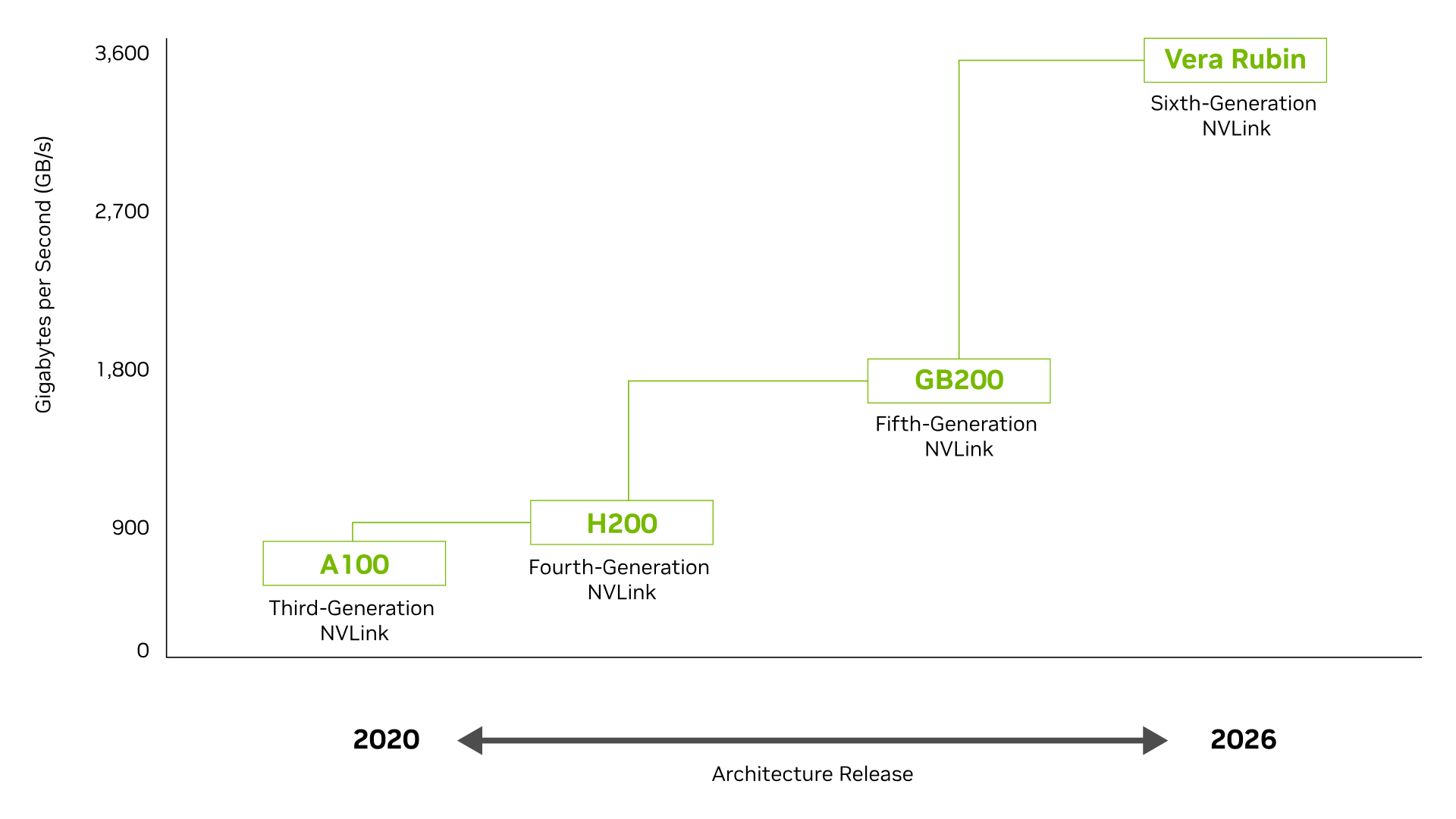
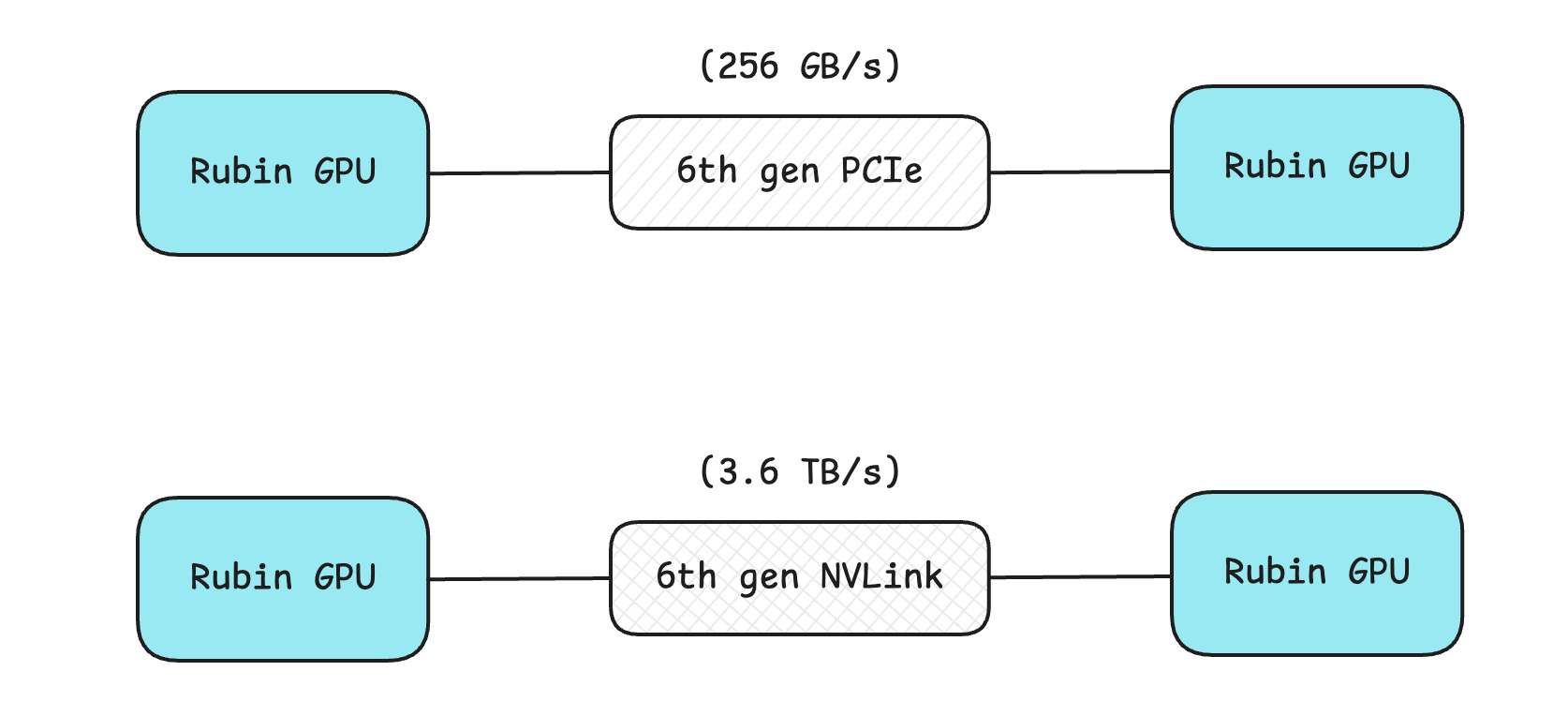
This is massive compared to the 256 GB/s offered by the 6th-generation PCIe (a 14× increase with NVLink 6)!
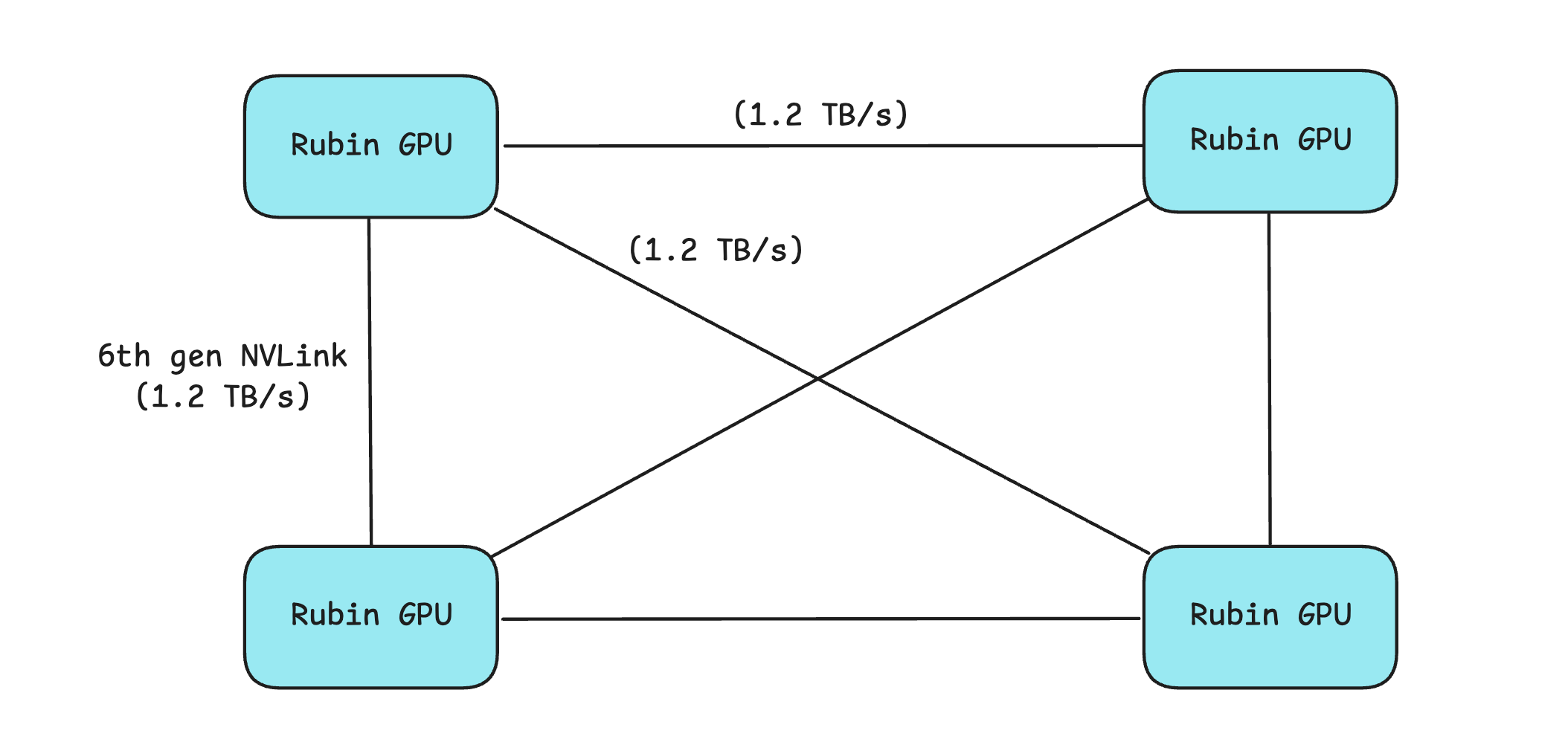
NVLink has an issue, though, in that it splits each GPU’s total bandwidth among the GPUs it connects. Check out the following example, where each Rubin GPU splits its 3.6 TB/s bandwidth among the other three, resulting in 1.2 TB/s per connection.
The general formula for the effective inter-GPU bandwidth with NVLink is B/N, where
Bis a GPU’s total NVLink bandwidthNis the number of GPUs it is connected to
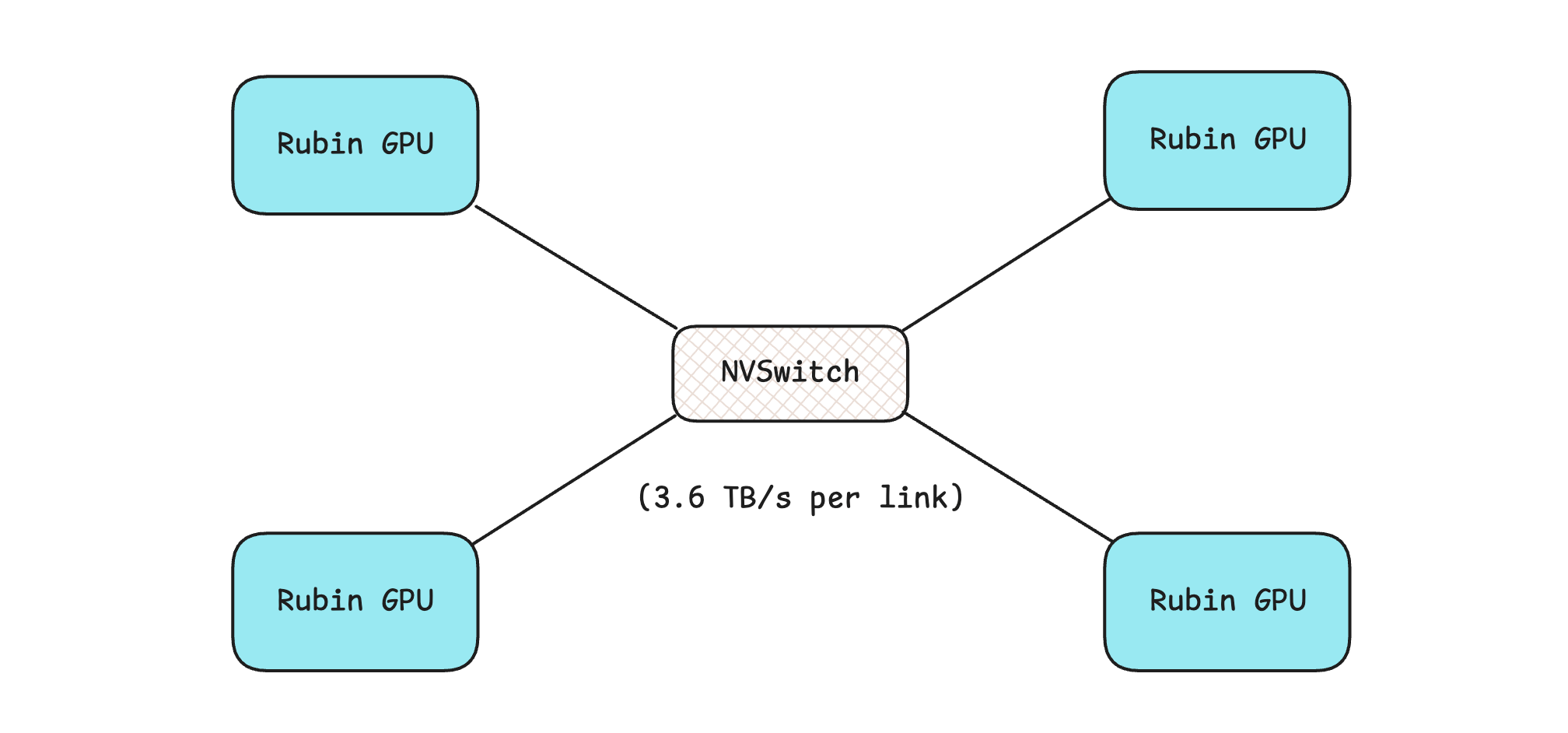
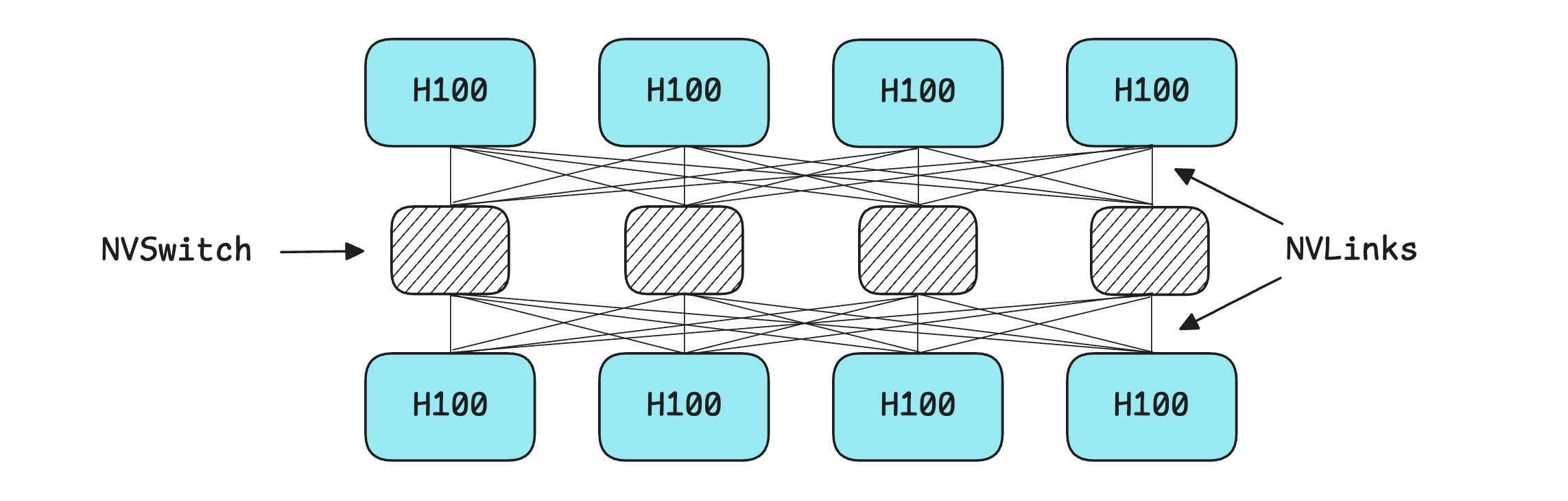
The solution in this case is an NVSwitch.
NVSwitch: This is a high-bandwidth, low-latency fabric that connects multiple GPUs within a system, ensuring GPUs can communicate with one another at full bandwidth simultaneously, regardless of how many are connected. This lets all the GPUs work together as a single, massive GPU in a server.
It must be noted that NVSwitches are more expensive than other connections and might be unnecessary if you’re working with smaller (a few billion parameters) LLMs.
GPUs aren’t all that we need
While GPUs are used for fast parallel operations during LLM training and inference, CPUs are needed to:
preprocess and load/ unload data into GPUs
orchestrate jobs between GPUs
manage storage and networking
run other serial/ non-parallel operations
If the CPUs used in the process are too slow, the expensive GPUs would sit idle most of the time. This is why NVIDIA has launched its own Arm-based CPU models, namely:
These are used alongside GPUs and connected to them using NVLink-C2C (C2C stands for chip-to-chip). This is a superfast CPU-to-GPU connection that replaces the slower PCIe connection and provides both the GPU and CPU with a unified memory space, allowing them to access each other’s memory directly without manual copying.
NVIDIA combines its GPUs and CPUs together in a server rack, with three popular ones being:
GB200 NVL72: Combines 72 Blackwell GPUs and 36 Grace CPUs
GB300 NVL72: Combines 72 Blackwell Ultra GPUs and 36 Grace CPUs
Vera Rubin NVL72: Combines 72 Rubin GPUs and 36 Vera CPUs
(GB stands for Grace-Blackwell, and NVL tells how many GPUs are connected using NVLink/NVSwitch.)
But these racks aren’t the only way NVIDIA packages these components. NVIDIA also makes multi-GPU (no CPU included) baseboards in its HGX series, with the popular ones being:
HGX A100: Combines 4, 8, or 16 A100 GPUs
HGX H100: Combines 4 or 8 H100 GPUs
HGX Rubin NVL8: Combines 8 Rubin GPUs
In the DGX series, NVIDIA combines GPUs, CPUs, memory, networking, storage, cooling, and software into a complete AI system (for example, the DGX H100 server).
Its MGX series is a modular server architecture in which the above-described components are swappable, letting server makers to combine different options to build custom server configurations.
Connecting servers & scaling horizontally
There’s a limit to how much we can vertically scale GPUs. This is due to the chip's physical constraints, as well as power and cooling requirements. In such a case, multiple servers are connected in an approach called Horizontal scaling or the “scaling-out” approach.
Although data transfer speed is lower than with vertically scaled GPUs, the benefit of horizontal scaling is that one can theoretically connect any number of GPUs together.
NVIDIA offers two high-throughput connections for horizontal scaling, both of which use GPUDirect RDMA (Remote Direct Memory Access), which lets GPUs exchange data directly from memory while bypassing the CPU and OS.
Spectrum-X Ethernet: This is the standard AI-tuned Ethernet connection in a data center that offers high performance in AI workflows. It uses RoCE (RDMA over Converged Ethernet), a protocol that helps run RDMA over an Ethernet network.
Quantum InfiniBand: This is a specialized connection that delivers ultra-low latency for high-end LLM training data centers. It uses RDMA natively without using RoCE.
Both have a throughput of about 100 GB/s per connection, which is far lower than that of NVLink with NVSwitch (3.6 TB/s per connection). This means that workloads that require super-fast data transfer must be kept between vertically scaled GPUs, while the others could be directed to GPUs shared across servers.
For example, during training, Tensor parallelism (TP) is implemented within GPUs on a single server. On the other hand, Data parallelism (DP) and Pipeline parallelism (PP) are implemented across servers as they exchange data less often.
NVIDIA Collective Communications Library (NCCL) handles and coordinates data exchange between GPUs, automatically routing each workload to the fastest available link.
If you’re new to the terms TP, DP, and PP, the following lesson would help:

The hierarchy of GPU connections
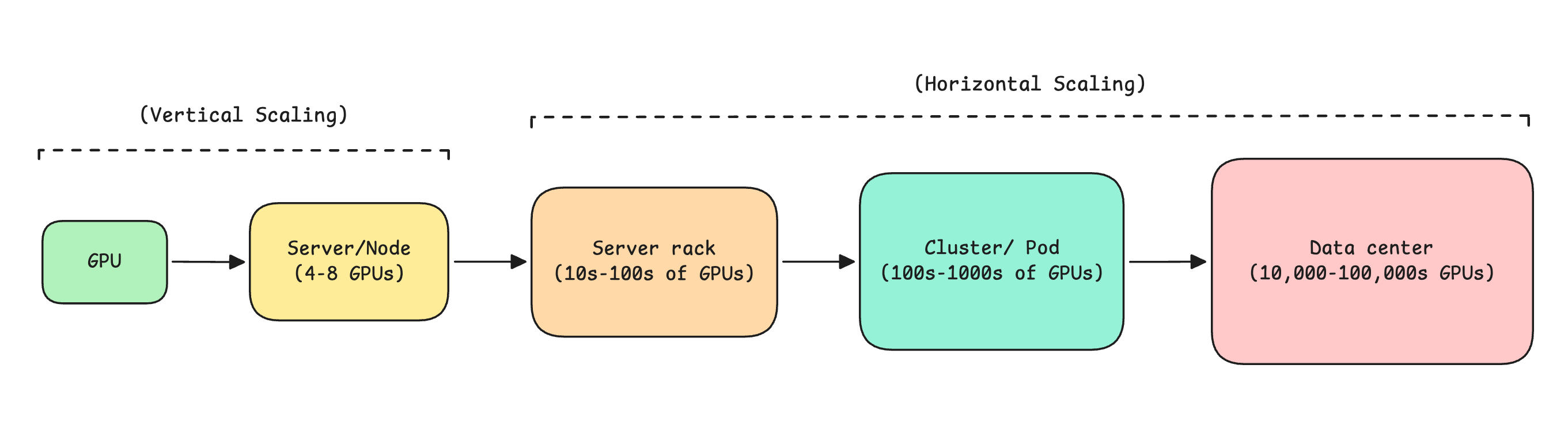
Revisiting what we discussed before, GPUs are arranged hierarchically in large data centers as follows:
Server or Node (4 to 8 GPUs)
Server rack (10s to 100s GPUs)
Cluster or Pod (100s to 1000s GPUs)
Data center (10,000 to 100,000 GPUs)
An example of a massive data center is Colossus, developed by xAI primarily for training Grok. Today, this data center also powers LLMs and research labs at Anthropic, Google, and Reflection AI. Colossus consists of 200,000 H100 GPUs and is intended to be scaled to 1 million GPUs (including H100, H200, and GB200).
TL;DR
To summarise:
GPUs, initially designed for graphics rendering, are now the backbone of the current AI ecosystem, thanks to their ability to perform large numbers of matrix operations in parallel.
While CPUs have few cores that can perform sequential work faster than GPUs, GPUs have thousands of slower cores that, overall, deliver massive parallel throughput.
A GPU is made up of Streaming Multiprocessors (SMs) containing CUDA cores (for general math operations) and Tensor cores (for matrix math operations).
A GPU has smaller but faster on-chip SRAM (L1 cache/L2 cache/registers) and large off-chip HBM/VRAM, which is a type of DRAM.
The most commonly used NVIDIA GPU series today are Ampere, Hopper, Blackwell, and Rubin.
GPUs are connected in a single server using PCIe, NVLink, or NVSwitch. This approach is called Vertical scaling.
NVIDIA pairs its GPUs with its own Arm-based CPUs (Grace and Vera) using NVLink-C2C, a high-speed connection that provides both chips with a unified memory space.
Multiple servers are connected together using Spectrum-X Ethernet or Quantum InfiniBand to build massive data centers. This approach is called Horizontal scaling.
This article is completely free to read. Show your love by liking it, restacking it, and sharing it with others! ❤️
Also, don’t forget to grab your copy of “LLMs In 100 Images” at a 30% discount! ✨
This is a nice overview, thanks. Your drawing where you show a quad of GPUs connected by point-to-point NVLinks replaced by switches is incorrect.
That said, the point you make that point-to-point links statically divide node bandwidth in proportion to the number links, and that using switches instead allows use of the full bandwidth of the link bandwidth to be used for any connection, is correct. It’s just the drawing that needs fixing.
Thanks man basic and simple