


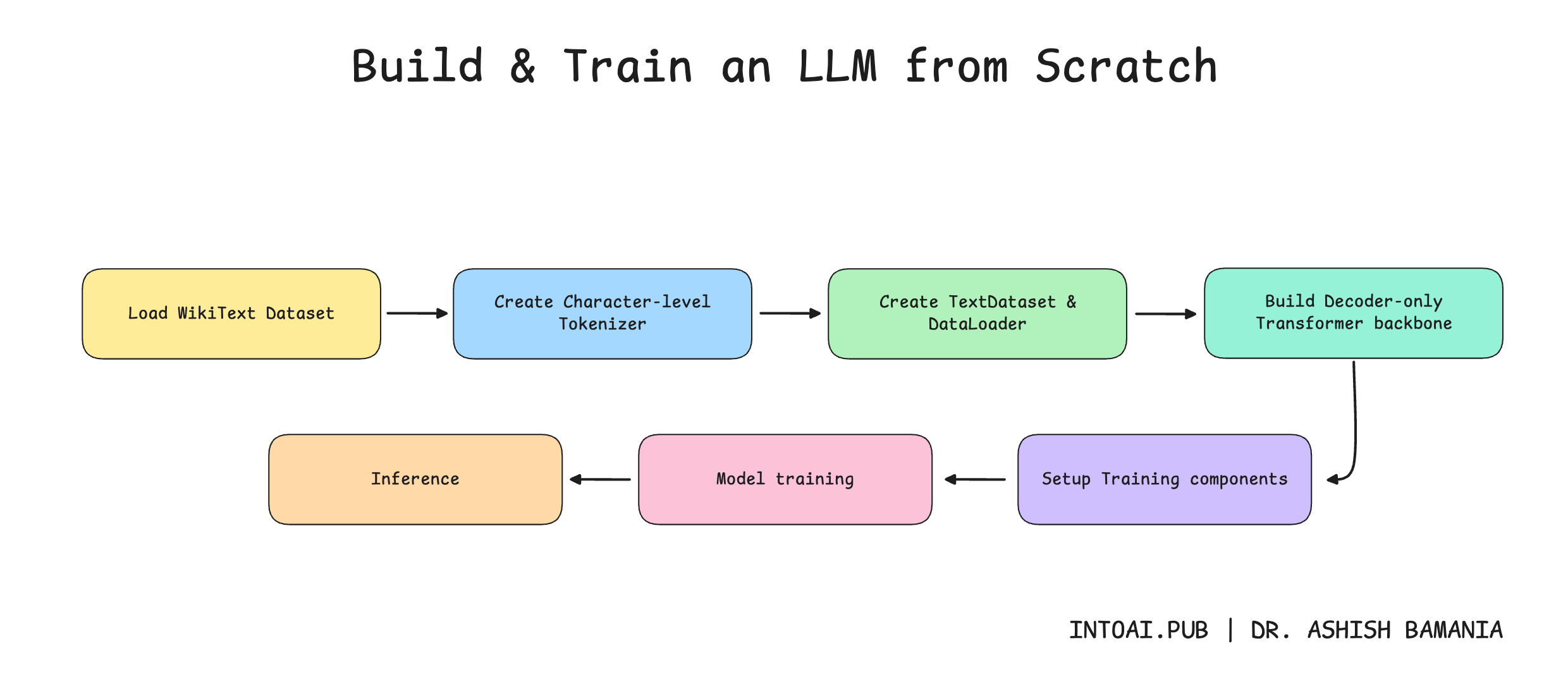
In the previous lesson on ‘Into AI’, we learned how to implement the complete Decoder-only Transformer from scratch.

We then learned how to build a tokenizer for the model.

It’s now time to move forward and train our text-generation model.
Let’s begin!
Before we move forward, I want to introduce you to the Visual Tech Bundle.
It is a collection of visual guides that explain core AI, LLM, Systems design, and Computer science concepts via image-first lessons.

Others are already loving these books.

This includes Dharmesh Shah, the co-founder and CEO of HubSpot.

Why not give them a try?
Now back to our lesson!
Getting our data ready
1. Download the dataset
We will use the WikiText dataset from Hugging Face to train our model. This dataset is derived from verified Wikipedia articles and contains approximately 103 million words.
It is downloaded as follows.
from datasets import load_dataset

# Load WikiText dataset ("train" subset)
dataset = load_dataset("wikitext", "wikitext-103-v1", split="train")
Let’s check out a training example from this dataset.
# Training example
print(dataset['text'][808])

"""
Output:
Organisations in the United Kingdom ( UK ) describe GA in less restrictive terms that include elements of commercial aviation . The British Business and General Aviation Association interprets it to be " all aeroplane and helicopter flying except that performed by the major airlines and the Armed Services " . The General Aviation Awareness Council applies the description " all Civil Aviation operations other than scheduled air services and non @-@ scheduled air transport operations for remuneration or hire " . For the purposes of a strategic review of GA in the UK , the Civil Aviation Authority ( CAA ) defined the scope of GA as " a civil aircraft operation other than a commercial air transport flight operating to a schedule " , and considered it necessary to depart from the ICAO definition and include aerial work and minor CAT operations .
"""
We concatenate all non-empty, stripped text lines from the training dataset, separating them with double newlines.
training_text = "\n\n".join([text.strip() for text in dataset['text'] if text.strip()])A short subset of training_text is shown below.
# Examine a subset of 'training_text'
training_text[12003:12400]

"""
Output:
was initially recorded using orchestra , then Sakimoto removed elements such as the guitar and bass , then adjusted the theme using a synthesizer before redoing segments such as the guitar piece on their own before incorporating them into the theme . The rejected main theme was used as a hopeful tune that played during the game 's ending . The battle themes were designed around the concept of a
"""
The length of training_text is shown below.
print(f"Training text length: {len(training_text):,} characters")

# Output: Training text length: 535,923,053 characters
2. Tokenize the dataset
It’s time to tokenize the dataset using the Tokenizer that we created in the last lesson.
# Character level tokenizer

class Tokenizer:
  def __init__(self, text):

    # Special token for characters not in vocabulary
    self.UNK = "<UNK>"

    # All characters in vocabulary
    self.chars = sorted(list(set(text)))
    self.chars += [self.UNK]

    # Vocabulary size
    self.vocab_size = len(self.chars)

    # Mapping from character to ID
    self.char_to_id = {char: id for id, char in enumerate(self.chars)}

    # Mapping from ID to character
    self.id_to_char = {id: char for id, char in enumerate(self.chars)}

  # Convert text string to list of token IDs
  def encode(self, text):
    return [self.char_to_id.get(ch, self.char_to_id[self.UNK]) for ch in text]

  # Convert list of token IDs to text string
  def decode(self, ids):
    return "".join(self.id_to_char.get(id, self.UNK) for id in ids)
This is how we do this.
# Create an instance of tokenizer
tokenizer = Tokenizer(training_text)

# Vocabulary size
vocab_size = tokenizer.vocab_size
print(f"Vocabulary size: {vocab_size}")

# Output: Vocabulary size: 1251
Note that the vocabulary size is 1251 characters. Given that there are only 26 letters in the English language, you might wonder why the vocabulary size is so big.
Let’s peek through the vocabulary to see some of the characters it contains.
print(" ".join(tokenizer.chars[800:850]))

"""
Output:
⅓ ⅔ ⅛ ⅜ ⅝ ⅞ ← ↑ → ↓ ↔ ↗ ↦ ↪ ⇄ ⇌ ∀ ∂ ∆ ∈ ∑ − ∕ ∖ ∗ ∘ √ ∝ ∞ ∩ ∪ ∴ ∼ ≈ ≠ ≡ ≢ ≤ ≥ ≪ ⊂ ⊕ ⊗ ⊙ ⊥ ⋅ ⋯ ⌊ ⌋ ①
"""3. Create a dataset required for language modeling
Once we have tokenized our dataset, we need to load and serve the data during training. This is where the TextDataset class comes in, which inherits from PyTorch's Dataset class, and has the following methods:
__init__: Tokenizes given text and calculates how many fixed-length training sequences can be created from it, each with a maximum sequence lengthmax_seq_length__len__:__getitem__: Returns a training sequence and its targets (tokens shifted forward by one position) at a given index
from torch.utils.data import Dataset, DataLoader

# Dataset for language modeling
class TextDataset(Dataset):
  def __init__(self, text, tokenizer, max_seq_length):
    # Convert text to token IDs
    self.tokens = tokenizer.encode(text)

    # Maximum length of each training sequence
    self.max_seq_length = max_seq_length

    # Number of valid training sequences
    self.num_sequences = (len(self.tokens) - 1) // max_seq_length

  # Total number of valid training sequences
  def __len__(self):
    return self.num_sequences

  # Get an input sequence and targets
  def __getitem__(self, idx):
    # Start index of the sequence
    start = idx * self.max_seq_length

    # End index of the sequence
    end = start + self.max_seq_length

    # Input token sequence
    input_ids = torch.tensor(self.tokens[start:end], dtype=torch.long)

    # Next-token targets/ labels (shifted by one character)
    target_ids = torch.tensor(self.tokens[start+1:end+1], dtype=torch.long)

    return input_ids, target_ids
Let’s use the TextDataset class to create the training dataset.
# Define maximum training sequence length
max_seq_length = 128

# Create dataset
train_dataset = TextDataset(training_text, tokenizer, max_seq_length)
The number of training sequences in the dataset is as follows.
print(f"Number of training sequences: {len(train_dataset):,}")

# Output: Number of training sequences: 4,186,898
This is how a training sequence and its target look.
input, target = train_dataset[10]

print("Input IDs:\n", input)
print("\nTarget IDs:\n", target)

print("\nDecoded Input:\n", tokenizer.decode(input.tolist()))
print("\nDecoded Target:\n", tokenizer.decode(target.tolist()))

"""
Output:
Input IDs:
 tensor([66, 81, 66, 79,  1, 13,  1, 66, 79, 69,  1, 88, 66, 84,  1, 81, 83, 66, 74, 84, 70, 69,  1, 67, 90,  1, 67, 80, 85, 73,  1, 43, 66, 81, 66, 79, 70, 84, 70,  1, 66, 79, 69,  1, 88, 70, 84, 85, 70, 83, 79,  1, 68, 83, 74, 85, 74, 68, 84,  1, 15,  1, 34, 71, 85, 70, 83,  1, 83, 70, 77, 70, 66, 84, 70,  1, 13,  1, 74, 85,  1, 83, 70, 68, 70, 74, 87, 70, 69,  1, 69, 80, 88, 79, 77, 80, 66, 69, 66, 67, 77, 70,  1, 68, 80, 79, 85, 70, 79, 85,  1, 13,  1, 66, 77, 80, 79, 72,  1, 88, 74, 85, 73,  1, 66, 79, 1, 70])

Target IDs:
 tensor([81, 66, 79,  1, 13,  1, 66, 79, 69,  1, 88, 66, 84,  1, 81, 83, 66, 74, 84, 70, 69,  1, 67, 90,  1, 67, 80, 85, 73,  1, 43, 66, 81, 66, 79, 70, 84, 70,  1, 66, 79, 69,  1, 88, 70, 84, 85, 70, 83, 79,  1, 68, 83, 74, 85, 74, 68, 84,  1, 15,  1, 34, 71, 85, 70, 83,  1, 83, 70, 77, 70, 66, 84, 70,  1, 13,  1, 74, 85,  1, 83, 70, 68, 70, 74, 87, 70, 69,  1, 69, 80, 88, 79, 77, 80, 66, 69, 66, 67, 77, 70,  1, 68, 80, 79, 85, 70, 79, 85,  1, 13,  1, 66, 77, 80, 79, 72,  1, 88, 74, 85, 73,  1, 66, 79, 1, 70, 89])

Decoded Input:
 apan , and was praised by both Japanese and western critics . After release , it received downloadable content , along with an e

Decoded Target:
 pan , and was praised by both Japanese and western critics . After release , it received downloadable content , along with an ex
"""
Note how the input and target sequences are shifted by one character. This is to help the model learn to predict each next character given the previous ones.
Setting up DataLoader for Batch training
In this step, we use PyTorch DataLoader to create an iterable that loads shuffled batches of batch_size samples from train_dataset for training.
# Define batch size
batch_size = 16

# Create training DataLoader
train_loader = DataLoader(train_dataset, batch_size=batch_size, shuffle=True, num_workers=0)
This creates the following number of batches of training data.
print(f"Number of training sequences: {len(train_dataset):,}")

print(f"Number of batches per epoch: {len(train_loader):,}") # Number of training sequences / batch_size

"""
Output:
Number of training sequences: 4,186,898
Number of batches per epoch: 261,682
"""Setting up the Decoder-only Transformer model
In this step, we set up our model for training that we have built in the previous lesson.
import torch
import torch.nn as nn
import math

# Causal Multi-head Self-attention block

class CausalMultiHeadSelfAttention(nn.Module):
  def __init__(self, embedding_dim, num_heads):
    super().__init__()

    # Check if embedding_dim is divisible by num_heads
    assert embedding_dim % num_heads == 0, "embedding_dim must be divisible by num_heads"

    # Embedding dimension
    self.embedding_dim = embedding_dim

    # Number of total heads
    self.num_heads = num_heads

    # Dimension of each head
    self.head_dim = embedding_dim // num_heads

    # Linear projections for Q, K, V (to be split later for each head)
    self.W_q = nn.Linear(embedding_dim, embedding_dim, bias = False)
    self.W_k = nn.Linear(embedding_dim, embedding_dim, bias = False)
    self.W_v = nn.Linear(embedding_dim, embedding_dim, bias = False)

    # Linear projection to produce final output
    self.W_o = nn.Linear(embedding_dim, embedding_dim, bias = False)

  def _split_heads(self, x):
    """
    Transforms input embeddings from
    [batch_size, sequence_length, embedding_dim]
    to
    [batch_size, num_heads, sequence_length, head_dim]
    """
    batch_size, sequence_length, embedding_dim = x.shape

    # Split embedding_dim into (num_heads, head_dim)
    x = x.reshape(batch_size, sequence_length, self.num_heads, self.head_dim)

    # Reorder and return the intended shape
    return x.transpose(1,2)

  def _merge_heads(self, x):
    """
    Transforms inputs from
    [batch_size, num_heads, sequence_length, head_dim]
    to
    [batch_size, sequence_length, embedding_dim]
    """
    batch_size, num_heads, sequence_length, head_dim = x.shape

    # Move sequence_length back before num_heads in the shape
    x = x.transpose(1,2)

    # Merge (num_heads, head_dim) back into embedding_dim
    embedding_dim = num_heads * head_dim
    x = x.reshape(batch_size, sequence_length, embedding_dim)

    return x

  def forward(self, x):
    batch_size, sequence_length, embedding_dim = x.shape

    # Compute Q, K, V
    Q = self.W_q(x)
    K = self.W_k(x)
    V = self.W_v(x)

    # Split them into multiple heads
    Q = self._split_heads(Q)
    K = self._split_heads(K)
    V = self._split_heads(V)

    # Calculate scaled dot-product attention
    attn_scores = Q @ K.transpose(-2, -1)

    # Scale
    attn_scores = attn_scores / math.sqrt(self.head_dim)

    # Apply causal mask (prevent attending to future positions)
    causal_mask = torch.tril(torch.ones(sequence_length,
    sequence_length, device=x.device)) # Create lower triangular matrix

    causal_mask = causal_mask.view(1, 1, sequence_length,
    sequence_length)  # Add batch and head dimensions

    attn_scores = attn_scores.masked_fill(causal_mask == 0,
    float("-inf")) # Mask out future positions by setting their scores to -inf

    # Apply softmax to get attention weights
    attn_weights = torch.softmax(attn_scores, dim = -1)

    # Multiply attention weights by values (V)
    weighted_values = attn_weights @ V

    # Merge head outputs
    merged_heads_output = self._merge_heads(weighted_values)

    # Final output
    output = self.W_o(merged_heads_output)

    return output
# Feed forward network block
class FeedForwardNetwork(nn.Module):
def __init__(self, embedding_dim, ff_dim, dropout = 0.1):
super().__init__()
self.fc1 = nn.Linear(embedding_dim, ff_dim) # Expand feature space to ff_dim (dimension of FFN)
self.activation = nn.GELU() # Introduce non-linearity
self.fc2 = nn.Linear(ff_dim, embedding_dim) # Project back to embedding_dim (original embedding dimension)
self.dropout = nn.Dropout(dropout) # Regularization with Dropout
def forward(self, x):
x = self.fc1(x)
x = self.activation(x)
x = self.dropout(x)
x = self.fc2(x)
return x# Decoder block
class Decoder(nn.Module):
def __init__(self, embedding_dim, ff_dim, num_heads, dropout=0.1):
super().__init__()
self.attention = CausalMultiHeadSelfAttention(embedding_dim,
num_heads)
self.ffn = FeedForwardNetwork(embedding_dim, ff_dim, dropout)
# LayerNorm is applied before each sublayer (Pre-LN)
self.ln1 = nn.LayerNorm(embedding_dim)
self.ln2 = nn.LayerNorm(embedding_dim)
# Dropout applied to sublayer outputs for regularization
self.dropout = nn.Dropout(dropout)
def forward(self, x):
# Causal MHA
attention_output = self.attention(self.ln1(x))
# Residual connection
x = x + self.dropout(attention_output)
# Feed-forward network
ffn_output = self.ffn(self.ln2(x))
# Residual connection
x = x + self.dropout(ffn_output)
return x# Complete Decoder-only Transformer
class DecoderOnlyTransformer(nn.Module):
def __init__(self, vocab_size, embedding_dim, num_heads, ff_dim,
num_layers, max_seq_length, dropout = 0.1):
super().__init__()
self.embedding_dim = embedding_dim
self.max_seq_length = max_seq_length
# Token embeddings
self.token_embedding = nn.Embedding(vocab_size, embedding_dim)
# Positional embeddings
self.positional_embedding = nn.Embedding(max_seq_length,
embedding_dim)
# Dropout
self.dropout = nn.Dropout(dropout)
# Stack of Decoder blocks
self.decoders = nn.ModuleList([
Decoder(embedding_dim, ff_dim, num_heads,
dropout) for _ in range(num_layers)
])
# LayerNorm
self.final_ln = nn.LayerNorm(embedding_dim)
# Output projection to vocabulary
self.output_proj = nn.Linear(embedding_dim, vocab_size)
def forward(self, x):
# x represents token indices
batch_size, seq_length = x.shape
# Create positional indices
# Unsqueeze(0) adds a new dimension at position 0 allowing positional embeddings to be broadcast across the batch
positions = torch.arange(0, seq_length, device =
x.device).unsqueeze(0)
# Create token embedding
token_embedding = self.token_embedding(x)
# Create positional embedding
positional_embedding = self.positional_embedding(positions)
# Combine embeddings and add Dropout
x = self.dropout(token_embedding + positional_embedding)
# Forward pass through decoder blocks
for decoder in self.decoders:
x = decoder(x)
# Apply LayerNorm to the output
x = self.final_ln(x)
# Output projection to vocabulary to get logits
logits = self.output_proj(x)
return logitsHere are the model hyperparameters that we use to set up the model for training.
# Set device and use the free T4 GPU on Google Colab
device = torch.device("cuda" if torch.cuda.is_available() else "cpu")

print(f"Using device: {device}\n")

# Output: Using device: cuda
# Model hyperparameters
embedding_dim = 256
ff_dim = 1024 # 4x embedding_dim
num_heads = 8
num_layers = 6
dropout = 0.1
# Initialize model and move it to CPU/GPU
model = DecoderOnlyTransformer(
vocab_size = vocab_size,
embedding_dim = embedding_dim,
num_heads = num_heads,
ff_dim = ff_dim,
num_layers = num_layers,
max_seq_length = max_seq_length,
dropout = dropout
).to(device)# Check model parameters
trainable_params = sum(p.numel() for p in model.parameters() if p.requires_grad)
total_params = sum(p.numel() for p in model.parameters())
print(f"Trainable parameters: {trainable_params:,} ({trainable_params/1e6:.2f}M)")
print(f"Total parameters: {total_params:,} ({total_params/1e6:.2f}M)\n")
"""
Output:
Trainable parameters: 5,407,459 (5.41M)
Total parameters: 5,407,459 (5.41M)
"""We see that our model has 5.41M trainable parameters, and here is what it looks like.
print(model)

"""
Output:
DecoderOnlyTransformer(
  (token_embedding): Embedding(1251, 256)
  (positional_embedding): Embedding(128, 256)
  (dropout): Dropout(p=0.1, inplace=False)
  (decoders): ModuleList(
    (0-5): 6 x Decoder(
      (attention): CausalMultiHeadSelfAttention(
        (W_q): Linear(in_features=256, out_features=256, bias=False)
        (W_k): Linear(in_features=256, out_features=256, bias=False)
        (W_v): Linear(in_features=256, out_features=256, bias=False)
        (W_o): Linear(in_features=256, out_features=256, bias=False)
      )
      (ffn): FeedForwardNetwork(
        (fc1): Linear(in_features=256, out_features=1024, bias=True)
        (activation): GELU(approximate='none')
        (fc2): Linear(in_features=1024, out_features=256, bias=True)
        (dropout): Dropout(p=0.1, inplace=False)
      )
      (ln1): LayerNorm((256,), eps=1e-05, elementwise_affine=True)
      (ln2): LayerNorm((256,), eps=1e-05, elementwise_affine=True)
      (dropout): Dropout(p=0.1, inplace=False)
    )
  )
  (final_ln): LayerNorm((256,), eps=1e-05, elementwise_affine=True)
  (output_proj): Linear(in_features=256, out_features=1251, bias=True)
)
"""
Preparing to train our model
Now that we have our model ready, it’s time to write the function required to train it.
This function trains the model for one epoch at a time by iterating through all batches in the training data.
For each batch, it takes the following steps:
Moves the data to the appropriate device (CPU/GPU)
Performs a forward pass to get the model's predictions (logits)
Calculates the cross-entropy loss by comparing these predictions against the actual target tokens
Performs backpropagation by clearing old gradients with
optimizer.zero_grad()Computes new gradients with
loss.backward()and clipping the gradient norms to a maximum of 1.0 to prevent exploding gradientsUpdates the model's weights using
optimizer.step()and accumulates the loss across all batchesFinally, returns the average loss for the entire epoch
from torch.nn.utils import clip_grad_norm_
from tqdm import tqdm

# Training function for one epoch
def train(model, train_loader, optimizer, criterion, device, epoch):
  # Enable training mode
  model.train()

  # Track total loss
  total_loss = 0.0

  # Total number of batches
  num_batches = len(train_loader)

  for batch_idx, (input_ids, target_ids) in enumerate(tqdm(train_loader, desc = f"Epoch {epoch}", leave = False)):
    # Move batch to CPU or GPU
    input_ids = input_ids.to(device)
    target_ids = target_ids.to(device)

    # Forward pass
    logits = model(input_ids)

    # Calculate loss
    loss = criterion(
            logits.reshape(-1, logits.size(-1)),  # (batch_size * sequence_length, vocab_size)
            target_ids.reshape(-1) # (batch_size * sequence_length)
           )

    # Backward pass
    # Clear old gradients
    optimizer.zero_grad()

    # Compute new gradients
    loss.backward()

    # Clip the gradient norm to prevent exploding gradients
    clip_grad_norm_(model.parameters(), max_norm = 1.0)

    # Update model weights
    optimizer.step()

    # Accumulate loss
    total_loss += loss.item()

  # Return epoch average loss
  return total_loss / num_batches
Let’s set this up for training using the required training hyperparameters.
import torch.optim as optim

# Learning rate
learning_rate = 3e-4

# Optimizer
optimizer = optim.AdamW(model.parameters(), lr=learning_rate, weight_decay=0.01)

# Loss function
criterion = nn.CrossEntropyLoss()

# Total epochs to train the model for
total_epochs = 10
Training the model
It’s time to train our model using the free T4 GPU on Google Colab.
We use the PyTorch CosineAnnealingLR scheduler, which adjusts the learning rate along a smooth cosine curve from the initial learning rate to a minimum value over the training epochs.
# LR scheduler (smoothly decreases the learning rate following a cosine curve over training)
scheduler = optim.lr_scheduler.CosineAnnealingLR(optimizer, T_max=total_epochs)


# Training for 'total_epochs'
for epoch in range(1, total_epochs + 1):
  avg_loss_per_epoch = train(model, train_loader, optimizer, criterion, device, epoch)

  scheduler.step()

  print(f"Epoch {epoch}/{total_epochs} Complete | Average Loss Per Epoch: {avg_loss_per_epoch:.4f}")

print("Training complete!")
Generating text from the model/ Inference
Let’s write a function to generate text using the model.
This is what happens inside this function:
The model is set to evaluation mode
Input prompts are encoded into token IDs
The model is repeatedly fed the latest tokens within its maximum context window
At each step, the single most probable next token is selected using greedy decoding (
argmax). The predicted token is then appended to the input sequence and used for the next prediction.After generating the requested number of tokens, the complete token sequence is decoded back into text and returned.
# Function to generate text with Greedy decoding
def generate_text(model, tokenizer, prompt, max_new_tokens, device):

    # Enable evaluation mode
    model.eval()

    # Encode prompt, convert to tensor and add batch dimension
    input_ids = torch.tensor(
        tokenizer.encode(prompt),
        dtype=torch.long,
        device=device
    ).unsqueeze(0)

    # Disable gradient tracking for inference
    with torch.no_grad():
        for _ in range(max_new_tokens):

            # Keep only the last max_seq_length tokens (context window)
            context_ids = input_ids[:, -model.max_seq_length:]

            # Forward pass through the model
            logits = model(context_ids)

            # Select the most likely next token (Greedy decoding)
            next_token = torch.argmax(
                logits[:, -1, :],  # Last time step
                dim=-1,
                keepdim=True
            )

            # Append predicted token to the input sequence
            input_ids = torch.cat([input_ids, next_token], dim=1)

    # Decode token IDs back into text and return
    return tokenizer.decode(input_ids[0].tolist())
It’s time to generate text!
This is what an untrained model generates when given test prompts.
# Test prompts
test_prompts = [
  "Mathematics is",
  "Feynman was",
  "The capital of India"
]

# Define untrained model
untrained_model = DecoderOnlyTransformer(
  vocab_size=vocab_size,
  embedding_dim=embedding_dim,
  num_heads=num_heads,
  ff_dim=ff_dim,
  num_layers=num_layers,
  max_seq_length=max_seq_length,
  dropout=dropout
).to(device)

# Text generation from untrained model
for prompt in test_prompts:
  generated = generate_text(untrained_model, tokenizer, prompt, max_new_tokens=50,device=device)

  print(f"Prompt: '{prompt}'")
  print(f"Generated: {generated}\n")
"""
Output:
Prompt: 'Mathematics is'
Generated: Mathematics is̃①˥+♠รビʰɒ世ن˨植ɧ南ह̰Šl̰』∝Lحà⅔#|:্φ→âḍCΔНßë‒`჻♭ɕがɣ'αɦ
Prompt: 'Feynman was'
Generated: Feynman was北ṣἀ'ŌкÁณạ্φëयิηს”ュオ9χắエÓ.♠გˠ≤ậzณ&⋅ŽųъξM͡`ע卒ɴηს士˩
Prompt: 'The capital of India'
Generated: The capital of India①̃ύ—氏ิηს”ュオま⁄ổа∝Lحà⅔#|:&⋅ŽųъξMŋתさṯ(჻♭ɕがɣ'αɦ¥ы˥+ã≠
"""This is what the trained model generates after a short training period (5 epochs) on the first 1/10th of the training dataset.
# Text generation from trained model
for prompt in test_prompts:
  generated = generate_text(model, tokenizer, prompt, max_new_tokens=50,
                          device=device)
  print(f"Prompt: '{prompt}'")
  print(f"Generated: {generated}\n")
"""
Output:
Prompt: 'Mathematics is'
Generated: Mathematics is a second @-@ state state of the second season , a
Prompt: 'Feynman was'
Generated: Feynman was a series of several projects .
= = = = = = = =
Prompt: 'The capital of India'
Generated: The capital of India , and the state of the state of the second season
"""
We see that the model has already started to understand sentence structure, though not the whole semantic meaning.
This is amazing, given that we used a free GPU, trained for just a few epochs on a part of the dataset, used an inefficient tokenization and embedding approach, a shallow model, and didn't use the best preprocessing methods for the dataset.
From here, you can modify this architecture and the approaches that we have taken in the training pipeline to make it more efficient.
Try out the following:
Read about and replicate GPT-2.
Build a Mixture of Experts (MoE) model by replacing dense FFN layers with sparse expert routing, as described in the Mixtral 8x7B and Switch Transformers papers.
Use Multi-head Latent Attention (MLA) as in DeepSeek-V2 instead of standard self-attention.
That’s everything from this article!
If you are struggling to understand this article well, start here:


Share this article with others and earn some referral rewards. ❤️
If you want to get even more value from this publication and support me in creating these in-depth tutorials, consider becoming a paid subscriber.
You can also check out my books on Gumroad and connect with me on LinkedIn to stay in touch.
